Open source · MIT · checked 13 Nov 2026

Self-Hosted Perp DEX with AI Agents: an open-source Hyperliquid terminal

Your own Hyperliquid trading terminal, with an AI agent that reads the chart and suggests trades but never places them. You host it and you confirm every order.

Clonegit clone https://github.com/rc-dran/self-hosted-perp-dex.git
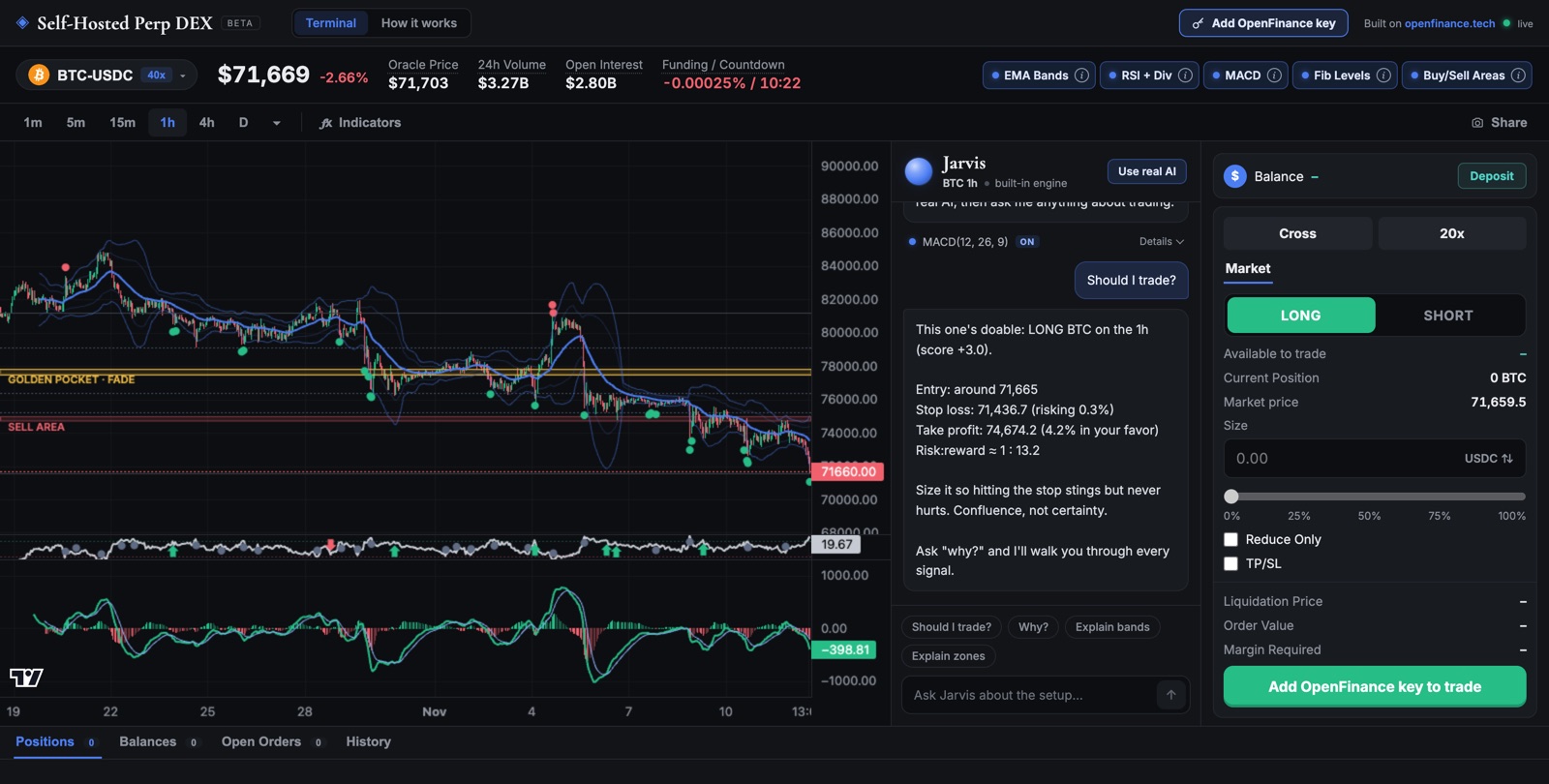
Self-Hosted Perp DEX with AI Agents: a BTC chart with indicators, Jarvis the AI agent on the right, and the trade ticket
The terminal running on a self-hosted copy: chart, Jarvis and the trade ticket. Screenshot from the GitHub repo.
Short answer

Self-Hosted Perp DEX with AI Agents is an open-source (MIT) trading terminal for Hyperliquid perpetuals that you run yourself. It has a live chart with five indicators, a trade ticket, and Jarvis, an AI agent that reads the chart and suggests an entry, stop and target. Jarvis never places an order; you confirm every trade. One OpenFinance key runs both the trading and the AI. Deploy it with Vercel in about a minute, build it with no code on OpenFinance Mainframe, or run it on your own computer. Hosting, charts, market data and Jarvis's built-in mode are free. Each Hyperliquid trade costs 2.5 basis points (0.025%) to OpenFinance, plus Hyperliquid's own fees. There is no KYC on OpenFinance.

Last checked 13 Nov 2026. This page is published by OpenFinance, which provides the trading and AI key this terminal uses, and the terminal's source code is maintained by the OpenFinance team. The software is free to host and run. Fees are listed below with sources. Nothing here is investment advice.

At a glance

Self-Hosted Perp DEX with AI Agents
What it isA Hyperliquid trading terminal you host: chart, AI agent, trade ticket, account panel
Markets300+ Hyperliquid perps: crypto, plus US stocks, indices, commodities and FX through HIP-3
AIJarvis: a free built-in engine, or 8 models from Anthropic, OpenAI, Google, xAI and DeepSeek
Who places ordersYou. Jarvis only advises; the ticket has a confirm step
WithdrawalsBlocked in the app. Its proxy allows a short route list, and withdrawals are not on it
Your keyKept in your browser tab only, gone when you close it
CostFree to run. 0.025% to OpenFinance per Hyperliquid trade, plus Hyperliquid's fees
Licence and codeMIT, TypeScript, React and Vite, on GitHub
Try it firstLive demo: chart, indicators and Jarvis, no key, analysis only

What you get

A chart, an AI agent and a ticket in one screen

This is your own copy of a Hyperliquid trading terminal. It is not a hosted exchange, and it is not a bot that trades while you sleep. Orders are real: they go to Hyperliquid from your own OpenFinance account.

The chart

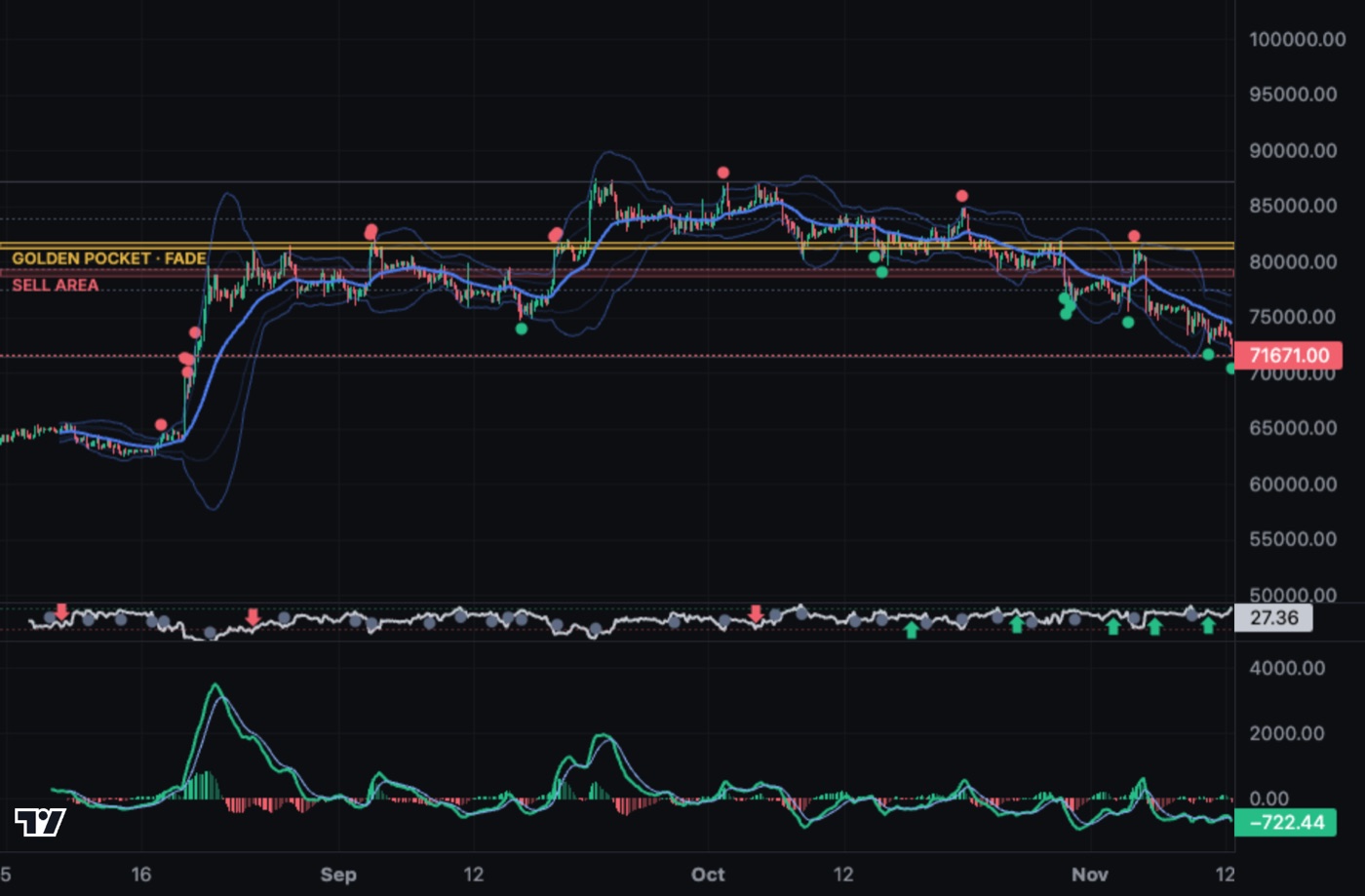
300+ markets (crypto, US stocks, indices, commodities and FX) on every timeframe from 1 minute to 1 month, with five indicators you turn on and off: EMA bands, RSI with divergences, MACD, auto-anchored Fibonacci, and buy and sell zones. Market data comes straight from Hyperliquid, so you can look without a key.

BTC 4-hour chart with EMA bands, RSI divergences, MACD, the Fibonacci golden pocket and a sell zone
Five indicators on a BTC 4-hour chart.

Jarvis, the AI agent

Ask "Should I trade?" and Jarvis reads the live chart and indicators, then gives a scored call: long, short or wait, with an entry, stop loss, target, risk to reward and the reasons. Ask "why?" about any indicator and it explains in plain words. The built-in engine is free and needs no key; the eight AI models use OpenFinance AI credits.
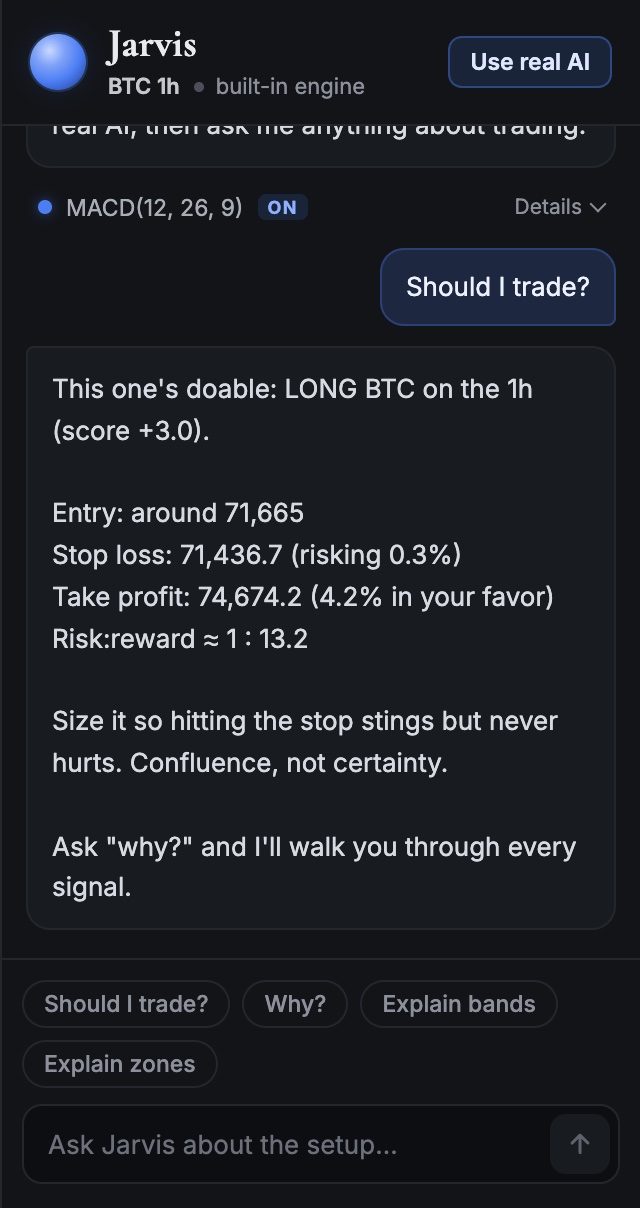
Jarvis calling a long on BTC 1h with entry, stop loss, take profit and risk to reward

The trade ticket

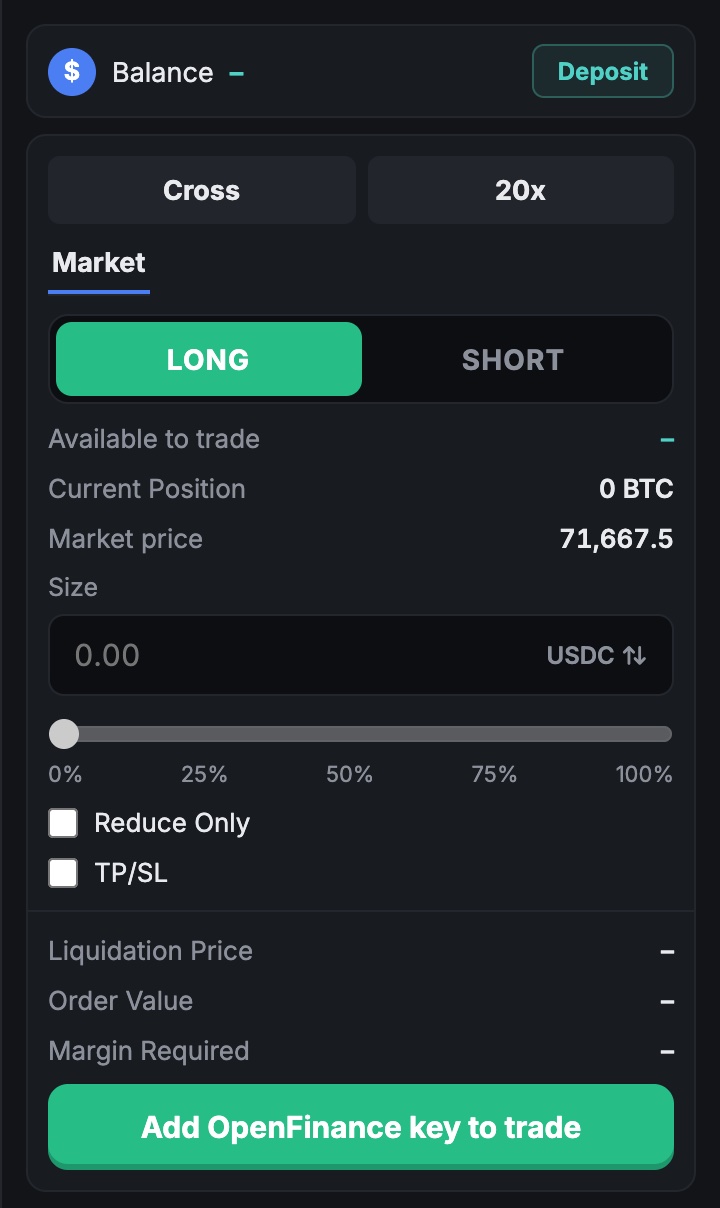
Market orders with leverage, cross or isolated margin, take-profit and stop-loss, a liquidation estimate and a confirm step. Nothing is sent until you press confirm. If the price moves more than 1% between your confirm and the send, the ticket stops and no order goes out.

Trade ticket with balance, cross or isolated margin, leverage, long or short, size and TP/SL

How it is put together

Your key only travels through your own copy

Market data and your account's positions and balances need no key: your browser reads them straight from Hyperliquid. Anything that uses your key goes through /api/of, the allowlisted edge function, to OpenFinance, which runs the AI models and places orders on your Hyperliquid account. The proxy stores nothing.

  1. Your browserChart, Jarvis and ticket
    • Reads prices and your positions straight from Hyperliquid, no key
    • Holds your key in this tab only
    • Sends an order only after you confirm
  2. /api/of on your copyAllowlisted edge function
    • Forwards 6 routes: AI, credits, deposit address, setup, leverage, orders
    • Withdrawals and everything else: 404
    • Stores and logs nothing
  3. OpenFinanceRuns the AI and the order
    • 8 AI models for Jarvis, paid in AI credits
    • Places the order on your Hyperliquid account
    • 0.025% per trade, plus Hyperliquid's fees

Market data never passes through OpenFinance: your browser reads it from api.hyperliquid.xyz directly.

This terminal is a front end you host. It is not an MCP server. To trade from Claude, ChatGPT, Grok or another assistant directly, add https://api.openfinance.tech/agent/mcp and sign in with OAuth or send an x-api-key header; see the MCP server install guides.

Deploy

Four ways to run it

Pick the path that fits how you work. None of them asks you to put secrets in project settings, because the app has no environment variables.

PathPick this ifCode neededTimeCost to deploy
Deploy on OpenFinanceYou don't code and want to change the app by chattingNoneA few minutesThe build uses AI credits
Deploy with VercelYou want this exact code live nowNoneAbout 1 minuteFree
Run on your computerYou want to try it or change the codeNode.js 20 or newerAbout 2 minutesFree
Host it yourselfYou want it always on, on your own machine or serverNode.js 20 or newerAbout 5 minutesFree

Deploy on OpenFinance

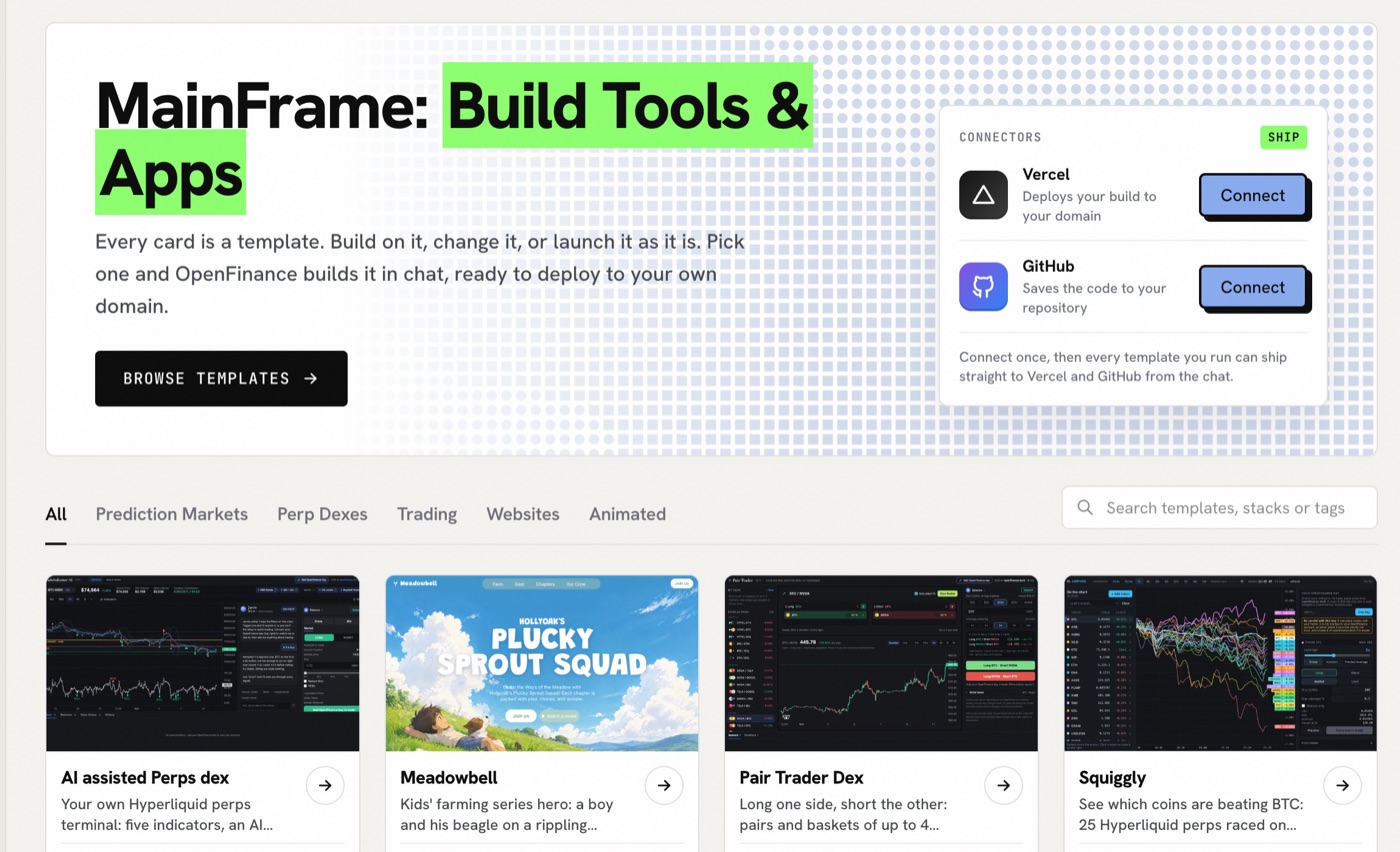
  1. Open openfinance.tech/mainframe and connect Vercel and GitHub once.
  2. Press Deploy on the AI assisted Perps dex card.
  3. Watch it build in a live preview. When it is done, it ships to your own Vercel project and GitHub repo.
  4. Keep chatting to change it, for example "Open on ETH 4h instead of BTC 1h" or "Add limit orders to the ticket".
OpenFinance Mainframe with Connect buttons for Vercel and GitHub and the template gallery
OpenFinance Mainframe: connect Vercel and GitHub, then press Deploy on the AI assisted Perps dex card.

Before you start

Tips for a good install

Try it before you add a key

The chart, indicators and Jarvis's built-in mode work on a fresh copy, and on the live demo. Add a key only when you want to trade or use an AI model.

Only paste your key into a copy you deployed yourself

Never into a demo someone else hosts, a random fork, or a screenshot request.

Expect to paste the key again

It lives in the tab's session storage, so closing the tab clears it.

Leave secret fields blank

The app has no environment variables, on purpose. If a host's form asks for secrets, you don't need any.

Use HTTPS on the public internet, and keep the link private

The key is sent with each trading or AI request to your copy's /api/of route.

An empty chart is a network problem

Check that your network can reach api.hyperliquid.xyz. Market data does not go through OpenFinance.

Search for markets you don't see

The picker lists the 250 busiest markets first; type a name to find the rest.

Change it by chatting

After a Mainframe deploy you can restyle the terminal or change the default market by asking, instead of editing files.

Safety

How safety works

Three rules are built into the code, and you can read each one in the repo.

  1. 01

    Jarvis advises, you decide

    Jarvis has no way to place an order. It returns text: a call with an entry, stop and target. Orders only come from you: the trade ticket after you press confirm, or the Close button on an open position after you click it twice. The ticket refuses to send if the price has moved more than 1% since you confirmed.

  2. 02

    The app can trade but cannot withdraw

    Every request that uses your key goes through /api/of, a small edge function that forwards only the routes below to OpenFinance. Everything else gets a 404, including withdrawals and transfers. The list is in api/_allow.ts.

  3. 03

    Your key stays in the tab

    Your OpenFinance key (it starts with open_) is kept in the browser tab's session storage. It is never written into the code, the build or environment variables, and the proxy doesn't log it. Every trading or AI request needs a valid key; there is no keyless trading. There is no KYC on OpenFinance.

The only routes the app may call

MethodRouteUsed for
POSTagent/v1/chat/completionsJarvis with an AI model
GETagent/chat/creditsAI credit balance
GETagent/trading/deposit-addressYour deposit address
GET, POSTagent/trading/abstractionOne-time account setup
POSTagent/trading/leverageLeverage and margin mode
POST, DELETEagent/trading/ordersPlace and cancel orders

Everything else gets a 404. Read the list in api/_allow.ts.

This is a different shape from letting a chat assistant place orders through the OpenFinance MCP server: in this terminal the AI cannot press confirm for you. For a longer look at agent risk, read Is agentic trading safe?. To report a security problem, use GitHub's private advisory form on the repo, as described in its SECURITY.md.

Costs

What it costs

Fees change. Numbers below were read on 13 Nov 2026; check each source before you trade.

ItemCost
The software, hosting on Vercel, charts, market data and Jarvis's built-in modeFree (MIT licence)
Each Hyperliquid trade2.5 basis points (0.025%) to OpenFinance, plus Hyperliquid's own fees
Jarvis with an AI modelAI credits ($1 = 10 credits). Each answer costs from $ (cheapest model) to $$$$ (priciest); see the models table below
Deploy on OpenFinance (Mainframe)The build uses AI credits
Worked example, before any discounts. A $1,000 market order on the BTC perp at the base tier: Hyperliquid 0.045% ($0.45) plus OpenFinance 0.025% ($0.25) is $0.70. Funding payments on perps are separate.

Hyperliquid's own fees depend on your rolling 14-day volume (Hyperliquid docs). At the base tier a perp market order pays 0.045% (taker) and a resting limit order 0.015% (maker). HIP-3 markets (stock, FX and commodity perps) can carry higher fees, so check the estimate in the ticket.

Leverage is set in the ticket and follows Hyperliquid's limit for each market (40x on BTC on 11 Nov 2026), which falls as the position grows (margin tiers). The 25 basis point OpenFinance fee for Polymarket and onchain swaps does not apply here, because this terminal trades only Hyperliquid perps. We don't claim this is the cheapest way to trade: Hyperliquid's own app skips OpenFinance's fee.

Under the hood

Jarvis's AI models and the five indicators

Jarvis's AI models

ModelBest forCost per answer
Built-in engineInstant rule-based reads, no keyFree
Claude Haiku 5.5 (default)Quick everyday reads$
GPT-5.6 LunaShort, to the point$
DeepSeek V4.1 FlashLong explanations at the low end of the credit range$
Gemini 3.8 FlashFast with some thinking$$
Grok 4.7Blunt takes$$
Claude Sonnet 5.5Sharper trade plans$$$
GPT-5.6 TerraStructured strategy$$$
Claude Opus 5.5Deepest analysis$$$$

The five indicators

IndicatorWhat it shows
EMA bandsA 30 EMA with a 2.5σ envelope, and a dot when a candle closes outside it
RSI and divergencesRSI(14) with bullish and bearish divergence tags between swing pivots
MACDMACD(12, 26, 9) with histogram and crossovers
FibonacciAuto-anchored to the biggest recent swing, with the 0.618 to 0.65 golden pocket
Buy and sell zonesThe nearest swing pivots above and below the price, sized by ATR

Use cases

What people use it for

You want to...How it helps
Get a second opinion before a tradeAsk Jarvis "Should I trade?" for an entry, stop, target and the reasons
Trade NVDA, gold or EUR/USD next to BTCHIP-3 markets sit in the same picker, on the same account
Give a community its own terminalDeploy it on your own domain and restyle it by asking in chat
Learn what the indicators meanToggle one and ask Jarvis "why?". The built-in mode is free and needs no key
Build on OpenFinance from a browserA working reference: the key stays in the tab, the proxy is allowlisted, withdrawals are blocked

Which should you pick?

If you wantUse
A chart, an AI read and a confirm button in one screen you ownThis self-hosted terminal
Trade from inside Claude, ChatGPT, Grok or Cursor by chatThe OpenFinance MCP server
TradingView data next to trade execution in a chatTradingView MCP plus OpenFinance
Hyperliquid with no extra layer and no OpenFinance feeHyperliquid's own app with your own wallet
OptionsThe OpenFinance app, through your own IBKR or Robinhood account. Not this terminal, and not the MCP

Risk note

Leverage can lose you more than you put in, and a small move can liquidate a position. The AI can be wrong. Nothing on this page is investment advice or a promise of profit, and you are responsible for every order you confirm. Check that trading these markets is legal where you live.

Frequently asked questions

What is Self-Hosted Perp DEX with AI Agents?

An open-source trading terminal for Hyperliquid perpetual markets that you run on your own computer, server or Vercel project. You get a live chart, an AI agent called Jarvis, and a trade ticket. Orders go to Hyperliquid from your own OpenFinance account.

Is it really a DEX?

It is a self-hosted front end for Hyperliquid, which is a decentralised perp exchange on its own chain. The terminal doesn't run an order book; it sends your orders to Hyperliquid through OpenFinance.

Does the AI place trades for me?

No. Jarvis gives a scored opinion with an entry, stop and target, and it has no way to place an order. You confirm every trade in the ticket, and the ticket refuses to send if the price moved more than 1% after you confirmed.

Can this app withdraw my funds?

No. The app can place and cancel orders, set leverage, read your AI credits, show your deposit address, and switch your account to Hyperliquid's unified mode once, automatically. Anything outside that short route list gets a 404, including withdrawals. The list is in the public file api/_allow.ts. The key itself can withdraw, so only paste it into a copy you deployed yourself.

Can I try it without an account?

Yes. The live demo shows the chart, indicators and Jarvis with no key and no sign-up, and never places orders. It runs under the project's earlier name, TradeIndicator AI. A fresh copy you run yourself works the same way until you add a key.

Do I need to know how to code?

No. Press the Deploy with Vercel button on the repo, or let OpenFinance Mainframe build and ship it after you connect Vercel and GitHub. Code is only needed if you want to change the source yourself.

What does it cost?

The software, charts, market data and Jarvis's built-in mode are free. Each Hyperliquid trade costs 2.5 basis points (0.025%) to OpenFinance, plus Hyperliquid's own fees. The optional AI models use OpenFinance AI credits ($1 = 10 credits), and a Mainframe deploy uses AI credits for the build.

Is there KYC?

Not on OpenFinance. You still need to check that trading these markets is legal where you live.

Where does my OpenFinance key go?

It stays in your browser tab's session storage and is cleared when you close the tab. It is never written into the project, and it only travels to your own copy's /api/of route, which forwards it to OpenFinance. Only paste it into a copy you deployed yourself.

Which markets can I trade here?

Hyperliquid perpetuals: more than 300 markets, including crypto and HIP-3 perps on US stocks, indices, commodities and FX. This terminal does not trade Polymarket, onchain swaps, spot or options.

Can I trade options here?

No. Options are available only in the OpenFinance app, through your own connected IBKR or Robinhood account. They are not in this terminal or in the OpenFinance MCP.

How is this different from trading with Claude or Grok?

This is a terminal you host, with a chart and a confirm button you press yourself. Trading with Claude or Grok uses the OpenFinance MCP server inside a chat app, where you also confirm orders. The difference is that here the AI cannot press confirm at all.

Which AI models can Jarvis use?

A free built-in engine, or eight models: Claude Haiku 5.5 (the default), GPT-5.6 Luna, DeepSeek V4.1 Flash, Gemini 3.8 Flash, Grok 4.7, Claude Sonnet 5.5, GPT-5.6 Terra and Claude Opus 5.5.

Can I change the code or the design?

Yes. It is MIT-licensed, so you can fork it and change anything. If you deployed through Mainframe you can also change it by chatting, for example asking for limit orders or a different default market.

Is this investment advice?

No. Leverage can lose you more than you put in, and the AI can be wrong. You are responsible for every order you confirm.

Related pages

Sources

By the OpenFinance team · Last updated · Not financial advice. Hyperliquid is a trademark of its owner; OpenFinance is not affiliated with Hyperliquid.